
Title Tags for Local Businesses: Formulas That Get Clicks
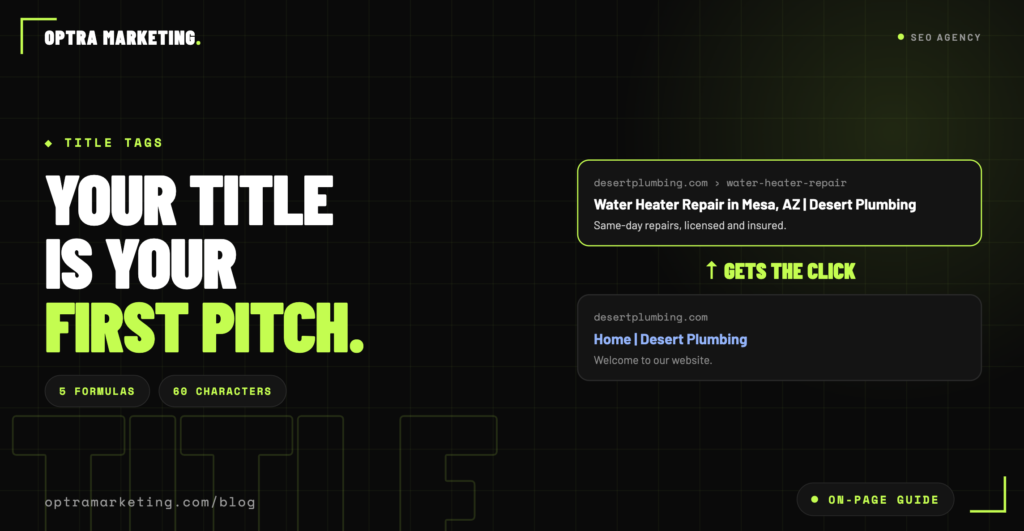
The title tag is the blue, clickable headline that appears for your page in Google’s results. It’s one of the strongest on-page signals you control, and it’s also your first sales pitch. A searcher scanning ten results for “AC repair Phoenix” spends a second or two on each title before deciding where to click.
Yet on many local business websites, every page has the same title, or just the company name, or a string of cities stuffed together. Getting title tag SEO right is one of the fastest, cheapest improvements you can make, and it often pays off without any change in rankings at all.
Title Tag SEO Basics: What a Title Needs to Do
A good title tag tells Google what the page is about, tells the searcher they’ve found what they’re looking for, and gives them a reason to choose you. Alongside the other local SEO ranking factors, it’s one of the clearest relevance signals on the page. For local businesses, that usually means including three things: the service, the location and the business name.
Google typically displays around 50 to 60 characters before cutting a title off. It measures by pixel width rather than characters, so wide letters take up more room. Put the most important words first so they survive if the title is truncated.
Title Tag Formulas That Work for Local SEO
Service Pages
Formula: Service + City | Brand
“Water Heater Repair in Mesa, AZ | Desert Plumbing”
Service Pages With a Differentiator
Formula: Service in City: Benefit | Brand
“Roof Replacement in Tampa: Free Inspections | Bayline Roofing”
Location Pages
Formula: Service in Location | Brand
“House Cleaning in Plano, TX | Spotless Home Co.”
Homepage
Formula: Primary Service + Main City | Brand, or Brand | Primary Service + City for well-known brands
“HVAC Repair & Installation in Charlotte | Carolina Air”
Blog Posts
Formula: Clear topic first, with the answer or benefit promised
“How Much Does a Kitchen Remodel Cost in Denver?”
These aren’t rules to follow mechanically, but starting points. What matters is that each title clearly matches what someone would search to find that page.
How to Write Title Tags That Earn the Click
Ranking gets you seen. The title decides whether you’re chosen, and a weak one is a common reason businesses end up ranking without getting calls. A few small additions can make a real difference:
- A specific benefit: same-day service, free estimates, 24/7 emergency response.
- Credibility: licensed and insured, family-owned since 1998, 500+ five-star reviews. Only use claims that are true and verifiable.
- Clarity over cleverness: “Emergency Plumber in Austin” beats “Your Plumbing Heroes.”
Pair each title with a meta description that expands on it and ends with a reason to click. Small improvements to both can noticeably lift your click-through rate from local results without any change in rankings.
Title Tag Mistakes We See Constantly
The Same Title on Every Page
Often just the business name, or “Home | Business Name.” Google can’t tell the pages apart, and neither can searchers. A unique title on every page is one of the first items on any technical SEO checklist for this reason.
City Stuffing
“Plumber Dallas Plano Frisco McKinney Allen Garland” reads as spam and wastes space. Build a dedicated landing page for each city to target other areas instead.
Keyword Repetition
“Roofing Company | Roofing Contractor | Roofers | Roof Repair” adds nothing and looks desperate.
Titles That Don’t Match the Page
A title promising pricing on a page that has no pricing frustrates visitors, and Google may rewrite it.
Forgotten Pages
Location pages, blog posts and CMS-generated pages often inherit a default title nobody reviewed. It’s especially common with templates such as Webflow CMS collections, where one pattern can be applied to dozens of pages at once.
Why Google Sometimes Rewrites Your Title
Google may display a different title than the one you wrote if it thinks yours doesn’t describe the page well. It often pulls from your H1 heading instead. Rewrites are most common when titles are very long, stuffed with keywords, repeated across pages or mismatched with the content. Keeping titles accurate, specific and consistent with your H1 reduces how often it happens.
Testing and Tracking Title Changes
Title tags aren’t set-and-forget. In Google Search Console, the Performance report shows impressions, clicks and click-through rate for each page and query. Note the figures before you change a title, then compare the same period a few weeks later. If impressions hold steady but clicks rise, the new title is working. If a page with plenty of impressions has a low click-through rate, its title is usually the first thing worth rewriting. Change a handful of pages at a time so you can tell which edits made the difference.
Frequently Asked Questions
How long should a title tag be?
Aim for roughly 50 to 60 characters. Longer titles aren’t penalized, but the end may be cut off in results, so put the service and location near the start.
Should every page include my city?
Service and location pages should. Pages like your about or contact page don’t need to target a location keyword, though including it is harmless where it fits naturally.
Should my brand name go first or last?
For most local service businesses, put the service and location first and the brand last. If your brand is already well known locally, leading with it on the homepage can work well.
Will changing my title tags affect my rankings?
It can, positively or negatively. Improving vague or duplicated titles usually helps. Be careful changing titles on pages that already rank well, and track the results after any change.
What’s the difference between a title tag and an H1?
The title tag appears in search results and browser tabs. The H1 is the main heading on the page itself. They should be closely related but don’t have to be identical.
Titles Written to Rank and to Sell
A title tag seems like a minor detail until you watch what a rewrite does to clicks from the very same rankings. Optra Marketing’s Starter plan includes keyword research plus custom meta titles and descriptions for your pages, each shaped around the exact phrases your customers type and the competitors appearing beside you in the results.
We don’t write them once and walk away. Search Console data shows us which titles are pulling clicks and which are being passed over, and we refine accordingly. Across all our local SEO work, every title is treated as a ranking signal and a small advert at the same time. Book a free strategy call, and we’ll go through your current titles and show you which ones are leaving clicks on the table.
