
Orphan Pages: The Service Pages Google Can’t Find
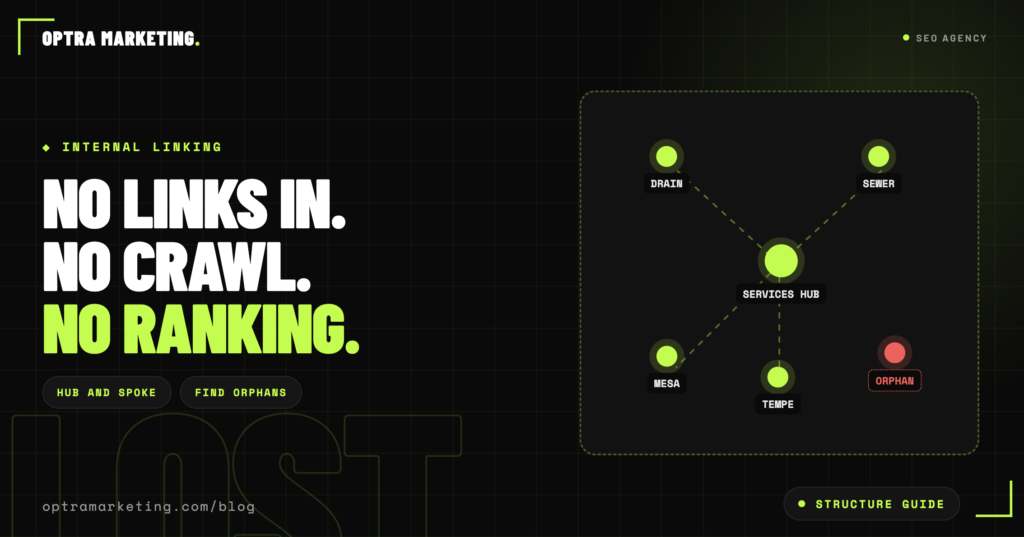
You paid for twenty location pages. They’re live, they’re in the sitemap, and they’re nowhere to be found in Google. When you check how visitors would reach them, you realize nothing on your website actually links to them.
Pages like these are called orphan pages. They exist, but they’ve been left without a parent: no menu item, no link from a related page, no path a visitor or search engine would naturally follow. They’re one of the most common and least visible problems on small business websites, and one of the easiest to fix.
Why Internal Links Matter So Much
Internal links do two jobs. They help visitors move through your site, and they tell Google which pages matter and how they relate to each other. A page linked from your homepage and main navigation is clearly important. A page linked from nowhere looks like an afterthought.
Internal links also carry authority. When other websites link to your homepage, that value flows through your internal links to the pages they point at. An orphan page receives none of it.
The result is predictable. Orphan pages are crawled less often, indexed less reliably and rarely rank, even when their content is strong.
How Pages End Up Orphaned
Location Pages Built in Bulk
A batch of city pages is published, but there’s no service-areas page or menu linking to them.
Redesigns
Navigation is simplified during a website redesign, and some pages lose the only links they had.
CMS Items
Pages created in a collection or custom post type aren’t automatically added to menus. It’s a frequent issue with Webflow CMS collections and WordPress custom post types alike.
Landing Pages for Ads
Pages built for paid campaigns are deliberately kept out of navigation, and later forgotten.
Old Blog Posts
Once a post drops off the first pages of the blog archive, it may have no other links pointing to it.
How to Find Orphan Pages
The principle is simple: compare the pages you know exist with the pages a crawler can reach by following links.
- Export a list of every URL from your XML sitemap or CMS.
- Export URLs that receive traffic from Google Analytics and Google Search Console.
- Crawl your site from the homepage with a tool such as Screaming Frog.
- Any URL in the first two lists but missing from the crawl is an orphan.
Some crawlers can do this automatically when connected to your sitemap and analytics accounts.
Bringing Orphan Pages Back Into the Site
For each orphan, decide whether it should exist. If it serves customers and should rank, link to it. If it’s obsolete or duplicated, redirect it to a better page or remove it. If it’s an ad landing page that shouldn’t appear in search, add a noindex tag to it.
For pages you keep, build links in the places a visitor would expect them:
- A services hub linking to every service page.
- A service-areas page linking to every location page, ideally grouped by region.
- Cross-links between related services, such as drain cleaning linking to sewer line repair.
- Links from location pages to services and from service pages to the main areas they cover.
- Contextual links in blog posts, placed on relevant phrases within the text.
This hub-and-spoke structure works especially well for businesses serving several locations, because it gives every area page a clear place in the site.
Internal Linking for Service Pages: Getting the Anchor Text Right
Adding links is only half the job; the words you link from matter too. Anchor text tells Google what the destination page is about, so it should describe the service or area plainly. A sentence such as “we also handle sewer line repair across the north side” gives Google far more context than a button reading “learn more.”
Vary the wording naturally rather than repeating the exact same phrase on every page, and keep each link where it genuinely helps the reader. A link that makes sense to a homeowner comparing services almost always makes sense to Google as well.
A Sitemap Isn’t Enough
Many owners assume that listing a page in the sitemap solves the problem. A sitemap helps Google discover URLs, but it doesn’t signal importance the way internal links do. Pages that appear only in the sitemap often end up as “Discovered – currently not indexed” in Search Console, waiting for a crawl that never becomes a priority.
Frequently Asked Questions
Are orphan pages bad for SEO?
They’re not harmful to the rest of your site, but they rarely perform well themselves. From an orphan pages SEO perspective, the issue is simple: without internal links, Google has little reason to crawl, index or rank them.
Should my PPC landing pages be orphaned?
It’s fine for ad landing pages to stay out of your navigation. If they shouldn’t appear in organic search, add a noindex tag so they don’t compete with your main service pages.
How many internal links should a page have?
There’s no magic number. Important service pages should be linked from your navigation or a hub page, plus a few relevant pages. What matters is that the links make sense to a visitor.
Do footer links count?
Yes, they’re crawlable links. But a footer crammed with dozens of city links is less useful than a well-organized service-areas page, and it can look spammy.
Will linking to an orphan page get it indexed quickly?
Usually it speeds things up considerably. Add the links, then request indexing in Search Console for your most important pages.
Reconnecting the Pages You’ve Already Paid For
Orphan pages are a symptom of weak site structure, and structure is the first thing Optra Marketing looks at. Before a single new page is written, we chart how everything on your site links together: which services point to which areas, where authority travels, and which pages have been cut off from the rest.
Then we rewire those connections so every page you’ve invested in can earn its keep. Our plans include on-page work for up to 10 core pages on Starter and 15 on Growth, which means your highest-value service and location pages get linked and optimized before anything else. A content strategy then extends the structure outward as the site grows. Book a free strategy call, and we’ll uncover the pages Google hasn’t been able to reach.
